

Handle iFrames in Puppeteer
Getting information from inside iframes is a known pain, especially for new developers when they are using tools like selenium and protractor. Fortunately, handling the iFrames is simpler and more straightforward in Puppeteer.
There are three stages to handle the iFrames in puppeteer :
- Find the iFrames
- Store the iFrames in a Variable
- Perform the operation on the variable as if it is an object of the page
Switch to Iframe in Puppeteer:
Let's consider the https://chercher.tech/practice/frames webpage which has multiple frames and a few are nested inside another frame.
You can find the iframe just like you find an element in puppeteer using the $eval.
const frameHandle = await page.$("iframe[id='frame1']");Once you find the iFrame we need to get the contents of the Iframe, for that you can use the
contentFrame function.const frame = await frameHandle.contentFrame();Puppeteer example for switching to Iframe entering text inside a text bar that is present inside a frame.
const puppeteer = require('puppeteer');
async function run(){
    const browser = await puppeteer.launch({headless:false, args: ['--start-fullscreen']})
    const page = await browser.newPage()
    await page.goto('https://chercher.tech/practice/frames');
    // handle frame
    const frameHandle = await page.$("iframe[id='frame1']");
    const frame = await frameHandle.contentFrame();
    // filling form in iframe
    await frame.type('input', 'chercher tech');
}
run()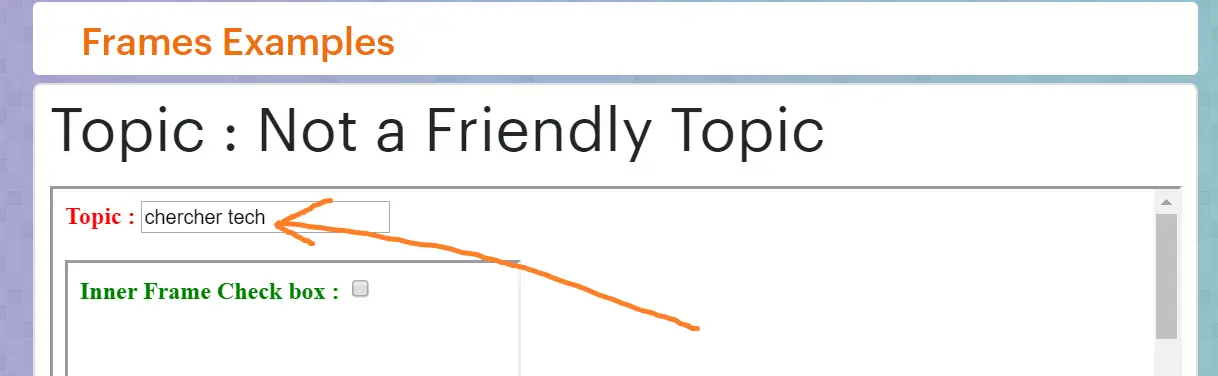
Otherway which did not work for me:
As per the official documents, I have followed the example code but somehow that did not work for me. I have given the code below along with the error.
await page.goto('https://chercher.tech/practice/frames');
const iframe1 = await page.frames().find(frame => frame.src =="frames1.html");
await iframe1.type("input", "hello")
The error I got :
(node:27672) UnhandledPromiseRejectionWarning: TypeError: Cannot read property 'type' of undefined
    at run (C:UsersuserDocumentspuppeteer_samplecucumber_pptrscrapper.js:7:19)
    at process._tickCallback (internal/process/next_tick.js:68:7)
(node:27672) UnhandledPromiseRejectionWarning: Unhandled promise rejection. This error originated either by throwing inside of an async function without a catch block, or by rejecting a promise which was not handled with .catch(). (rejection id: 1)
(node:27672) [DEP0018] DeprecationWarning: Unhandled promise rejections are deprecated. In the future, promise rejections that are not handled will terminate the Node.js process with a non-zero exit code.
Switching from frame to the parent page in puppeteer:
When we are working in the child frame of a page and if we want to switch the page level then we do not have to switch or do anything. Just use the page variable as if you never inside a frame, the puppeteer will perform the task on the page level.
const puppeteer = require('puppeteer');
async function run(){
    const browser = await puppeteer.launch({headless:false, args: ['--start-fullscreen']})
    const page = await browser.newPage()
    await page.goto('https://chercher.tech/practice/frames');
    // handle iframe
    const frameHandle = await page.$("iframe[id='frame1']");
    const frame = await frameHandle.contentFrame();
    // filling form in iframe
    await frame.type('input', 'chercher tech');
    // handle the page after iframe handling
    var labelText = await page.$eval("label", label=> label.textContent)
    console.log("The text : " + await labelText )
}
run()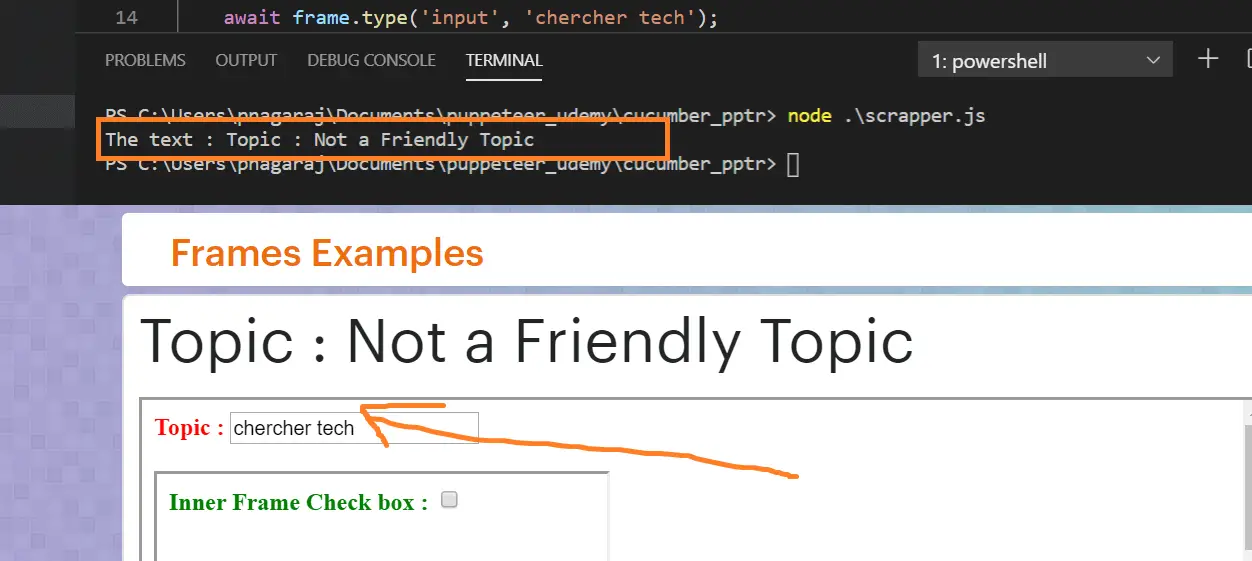
Some FAQ about handling Iframes in Puppeteer
How to enter text in a field which is present in Iframe using Puppeteer?
How to Click a button present in an Iframe using a puppeteer?
wait till iFrame loads onto a page in puppeteer?
How to take a screenshot of an Iframe?
How to handle nested IFrames in Puppeteer?
Get the Frames Content inside an Iframe?
Recommended Readings
I am Pavankumar, Having 8.5 years of experience currently working in Video/Live Analytics project.
