

What is Python UnitTest Framework
In automation testing, organizing your code is very important, and the client expects us to write automation scripts according to the manual test cases.
We can get an excellent reporting structure if we can exactly map our automation code with manual test cases.
In Python, we can use the UnitTest testing framework to organize our automation code and to extract reports.
To use the methods present in the UnitTest framework, we have to extend the TestCase class present in the Unittest module
import unittest
# extend Testcase class
class DefaultWidgetSizeTestCase(unittest.TestCase):
test fixture
A test fixture represents the preparation needed to perform one or more tests, and any associate cleanup actions. This may involve, for example, creating temporary or proxy databases, directories, or starting a server process.
test case
A test case is the individual unit of testing. It checks for a specific response to a particular set of inputs. unittest provides a base class, TestCase, which may be used to create new test cases.
test suite
A test suite is a collection of test cases, test suites, or both. It is used to aggregate tests that should be executed together.
test runner
A test runner is a component that orchestrates the execution of tests and provides the outcome to the user. The runner may use a graphical interface, a textual interface, or return a special value to indicate the results of executing the tests.
Things to remember while writing unit tests
There few things you should remember while writing unit test cases. I have listed a few below. Comment if you know any other than these, I am happy to add.
1. Each test is written must be fully independent.
2. Each test must be able to run alone, regardless of the order in which they are called.
3. A testing unit should focus on one tiny bit of functionality and prove it correct.
4. Make tests that run fast. Because even if one single test needs more than a few milliseconds to run, the development will be slowed down.
5. Use long and descriptive names for testing functions.
6. Reliable. Tests shouldn’t be bound to a given environment or rely on external factors to work. They should work 100% of the time, or they are not going to fulfill their purpose.
7. Don’t make unnecessary assertions
8. Aim for each unit test method to perform precisely one assertion
9. Do not print anything out in unit tests
10. Put assertion parameters in the proper order.
Tests in Unittest Python
We have to write automation test according to your manual test cases, all the test in python unittest starts with test prefix.
Based on the tests only the report will be generated; tests can or fail based on the checkpoints present in the test.
import unittest
class Test(unittest.TestCase):
	# test should start with test prefix
	def test_FirstTest(self):
		print("This is to show case the simple Test")
if __name__ == "__main__":
	unittest.main()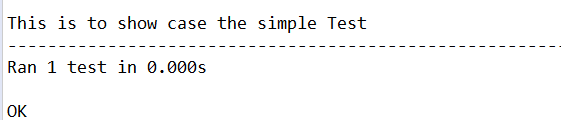
Let's open the Google page in selenium python using the unittest framework.
import unittest
from selenium import webdriver
class BingTest(unittest.TestCase):
	def test_Open_bing(self):
		driver = webdriver.Chrome(executable_path=r'D:PATHchromedriver.exe')
		driver.get("https://bing.com")
		print("Title is : " + driver.title)
if __name__ == "__main__":
	unittest.main()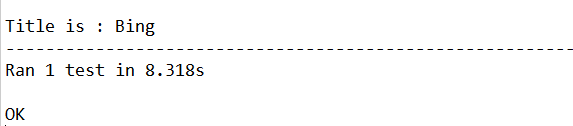
setUp
setUp method will execute before every test method present in the test class, for example, if we have 100 test cases and one setup method.
SetUp method will get executed 100 times before running the test; the setUp method will be useful when we want to write some code that is not related without checkpoint in our test case.
Consider this scenario, you have to check the title of 100 websites, and you have to open the browser newly for every website. Do you think we should write the browser opening code 100 times, and I know you think that, why cannot I just write the steps in a method and call it in tests.
You can write the common steps in a method, but I do not think you will like to call the method 100 times in your code; am I right ?.
In the above scenario, we can put such common code or call to common code in your setUp method, so that it will get executed 100 times.
Note : If there is an error in the setUp method then tests will not be executed
import unittest
from selenium import webdriver
class Test(unittest.TestCase):
	def setUp(self):
	 self.driver = webdriver.Chrome(executable_path=r'D:PATHchromedriver.exe')
	 print("Browser Opened")
	def test_open_chercher_tech(self):
	   self.driver.get("https://chercher.tech")
	   print("Opening CherCherTech")
	def test_open_bing(self):
		self.driver.get("https://bing.com")
		print("Opening Bing")
	def test_open_google(self):
		self.driver.get("https://google.com")
		print("Opening google")
if __name__ == "__main__":
	unittest.main()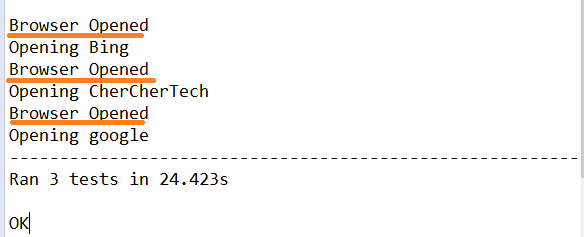
Order of Test Execution :
We will not have control over how the tests are executed; by default, python unittest executes them in alphabetical order.
I am still researching on how to give some priority to the tests so that they will execute in a user-defined order.
tearDown
tearDown method gets executes just after a test completes its execution, and this method is one time defined in the class.
tearDown method executes for each and every test case present in the test Class in python unittest
Most of the time tearDown method will contain code to close the browser, or to logout or some completion action.
Both setUp and tearDown can be associated with a test in the same test class.
If setUp() executed, tearDown() will be run whether the test method successful or not.
import unittest
from selenium import webdriver
class Test(unittest.TestCase):
	def setUp(self):
	 self.driver = webdriver.Chrome(executable_path=r'D:PATHchromedriver.exe')
	 print("Browser Opened")
	def test_open_chercher_tech(self):
	   self.driver.get("https://chercher.tech")
	   print("Opening CherCherTech")
	def tearDown(self):
		self.driver.quit()
		print("Browser closed")
if __name__ == "__main__":
	unittest.main()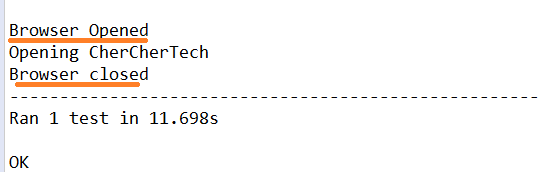
setUpClass
setUpClass method will be executed before running any test method or setUp or tearDown method present in the test Class
setUpClass method gets executed once per test class. setUpClass is called with the class as the only argument and must be decorated as a classmethod(): For example, if you want to open a browser once per test class, then we can use setUpClass.
SetUpClass does not require any setUp method to be present in the test class.
If an exception is raised during a setUpClass then the tests in the class are not run, and the tearDownClass is not run.
import unittest
from selenium import webdriver
class Test(unittest.TestCase):
	@classmethod
	def setUpClass(cls):
		cls.driver = webdriver.Chrome(executable_path=r'D:PATHchromedriver.exe')
		print("Browser Opened in setUpClass method")
	def test_open_chercher_tech(self):
		self.driver.get("https://chercher.tech")
		print("Opening CherCherTech")
if __name__ == "__main__":
	unittest.main()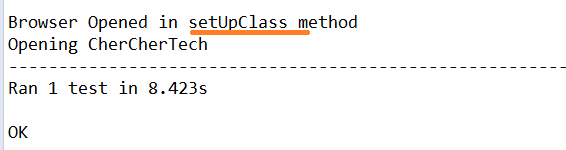
tearDownClass
tearDownClass method will be executed after completing all the test methods and all in a class, so the tearDownClass method will be executed just before exiting the class from memory.
tearDownClass method will be executed only once in the python unittest, and we should annotate this method as @classmethod.
We can use the tearDownClass method, whether the setUpClass method is present or not in the test class.
The below example shows a test class with the setUpClass method, setUp method, test method, tearDown method, and tearDownClass method.
import unittest
from selenium import webdriver
class Test(unittest.TestCase):
	@classmethod
	def setUpClass(cls):
		cls.driver = webdriver.Chrome(executable_path=r'D:PATHchromedriver.exe')
		print("Browser Opened in setUpClass method")
	@classmethod
	def tearDownClass(cls):
		cls.driver.quit()
		print("browser closed in tearDownClass method")
	def setUp(self):
		self.driver.get("https://google.com")
		print("opening google in setUp method")
	def tearDown(self):
		self.driver.back()
		print("Navigating back in tearDown method")
	def test_click_about_link(self):
		self.driver.find_element_by_link_text("About").click()
		print("Clicking on About link in google page in test method")
if __name__ == "__main__":
	unittest.main()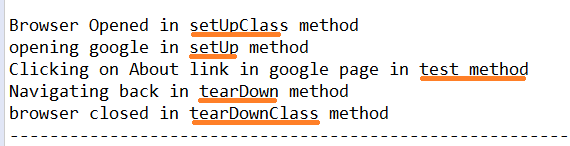
setUpModule & tearDownModule
setUpModule will be executed before executing any class or any method present in the test class. this will be executed once per module in python.
tearDownModule will be executed after completing everything present in the python module, and This method will be executed once per python module.
setUpModule and tearDownModule methods are newly added to the python unittest framework
Execution flow is : setUpModule > setUpClass > setUp > test > tearDown > tearDownClass > tearDownModule, Position of the methods will not alter the flow of the execution.
If an exception is raised in a setUpModule, then none of the tests in the module will be run, and the tearDownModule also will not be run.
import unittest
def setUpModule():
	print("setUpModule")
def tearDownModule():
	print("tearDownModule")
class Test(unittest.TestCase):
	@classmethod
	def setUpClass(cls):
		print("setUpClass")
	@classmethod
	def tearDownClass(cls):
		print("tearDownClass")
	def setUp(self):
		print("setUp")
	def tearDown(self):
		print("tearDown")
	def test_sample_method(self):
		print("test_sample_method")
if __name__ == "__main__":
	unittest.main()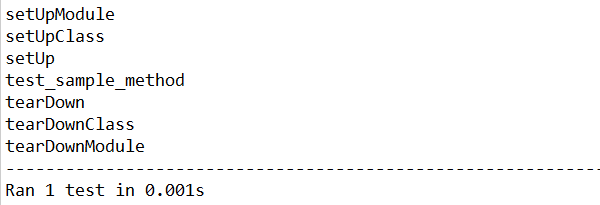
Skipping tests and expected failures
Sometimes we may want to skip a particular test because of some reasons; reasons could be 1. the functionality is broken, 2. applicable to a specific condition, 3. Operating system based test cases so on.
We can skip a test by decorating a test method with a unittest.SkipTest decorator
When we skip a test, the unittest framework de-couples the setUp and tearDown methods associated with it, Unittest will skip all the setup and teardown method
import unittest
from selenium import webdriver
class Test(unittest.TestCase):
	def setUp(self):
		self.driver = webdriver.Chrome(executable_path=r'D:PATHchromedriver.exe')
		print("Browser Opened")
	def tearDown(self):
		self.driver.quit()
		print("Browser closed")
	@unittest.SkipTest
	def test_open_chercher_tech(self):
		self.driver.get("https://chercher.tech")
		print("Opening CherCherTech")
	def test_open_google(self):
		self.driver.get("https://google.com")
		print("Opening google")
if __name__ == "__main__":
	unittest.main()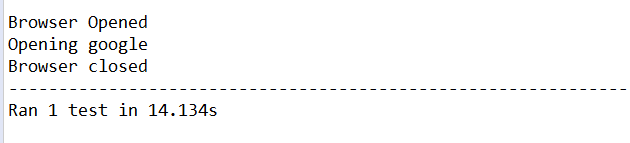
Skip Test with reason :
We can give a reason why we are skipping the test, in the SkipTest decorator
import unittest
from selenium import webdriver
class Test(unittest.TestCase):
	def setUp(self):
		self.driver = webdriver.Chrome(executable_path=r'D:PATHchromedriver.exe')
		print("Browser Opened")
	@unittest.skip("my test, my wish to skip the test")
	def test_open_chercher_tech(self):
		self.driver.get("https://chercher.tech")
		print("Opening CherCherTech")
if __name__ == "__main__":
	unittest.main()
Skip Test with skipIf :
We can skip the test using specific conditions like using if statements, skipIf method gives the ability to the user to skip the test specific condition.
We can provide reason about the conditions, s the second parameter in the decorator.
@unittest.skipIf( 2 > 6, "two is always greater than 6, ha ha ha")
def test_run_based_on_condition(self):
	self.driver.get("https://chercher.tech")
	print("Opening CherCherTech")
Skip Test with skipUnless :
We can skip the methods using skipUnless decorator; this is also similar to the skipIf decorator.
This method will be useful when we are running our test cases based on the operating system.
import unittest
import sys
from selenium import webdriver
class Test(unittest.TestCase):
	def setUp(self):
		self.driver = webdriver.Chrome(executable_path=r'D:PATHchromedriver.exe')
		print("Browser Opened")
	@unittest.skipUnless(sys.platform.startswith("win"), "requires Windows")
	def test_run_in_windows_only(self):
		self.driver.get("https://chercher.tech")
		print("Opening CherCherTech")
if __name__ == "__main__":
	unittest.main()
expectedFailure :
expectedFailure decorator helps the user to pass the test case even when there is a failure in the test, and this method will be useful when you are testing negative test cases.
import unittest
from selenium import webdriver
class Test(unittest.TestCase):
	def setUp(self):
		self.driver = webdriver.Chrome&
Recommended Readings
I am Pavankumar, Having 8.5 years of experience currently working in Video/Live Analytics project.
expectedFailure :
programme is incomplete and this kind of incomplete programme found at end of all course content .
Hi,
I dun understand why this one exists when using TestSuite, I imported like:
from unittest import TestSuite
not :
from unittest.suite import TestSuite
and it still works! , what is 'suite ' after unittest??
Thank you
