

WebElement in Python
Webelement is anything present on the webpage such as textbox, text, button, link, table, radio button, checkbox, etc. Before performing any action on webelement ( typing, clicking, selecting, etc.), selenium has to identify those elements uniquely.
Locating Web Elements in Selenium Python
To interact with UI objects with Selenium python, we need to identify webpage elements fast and in an accurate way (sometimes uniquely). We can find the web elements on a webpage using locators provided by selenium python; Selenium python offers 8 types of locators.
Methods to find Web element in selenium python
Below are few ways to find a web element based on the locators in Selenium python bindings:
- Find Element by ID
- Find Element By Name
- Find Element By Class Name
- Find Element by tagname
- Find Element by Link Text
- Find Element By partial LinkText
- Find Element By CSS Selector
- Find Element By Xpath
All the above method raises a
The priority of Locators in Selenium
Automation developers should use the locator in the below order; so that the failures will get reduced; if id has more than one match then the user should try with Name so on...
- Id
- Name
- ClassName
- CSS
- Xpath
Sample HTML for Locators Example
Store below Html code in your local system with .html format, and open in chrome or any other browser.
<html>
	<body>
		<div id="pancakes">
			<a href="https://chercher.tech" >Selenium Webdriver</a>
			<button id="firstButton" type="button">Blueberry</button>
			<button type="button" name="Ban" class="Banana">Banana</button>
			<button type="button" name="cake" value="Strawberry">Strawberry</button>
		</div>
	</body>
</html>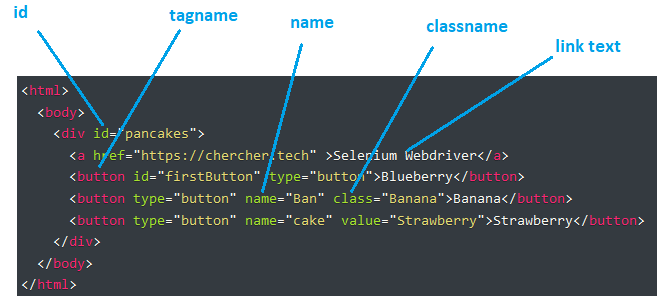
Install Selenium Python Step by step
Find Element by Id
We can use find_element_by_id method when you know the id attribute of an element. This method returns the first matching element if there is more than one match.
The below code points to the element which has id as pancakes
driver.find_element_by_id("pancakes")Find Element By name.
We can use find_element_by_name method when you know the name attribute of an element. Find Element By name method returns the first occurring element which has a matching name attribute.
The below code tries to find the element which has a name as Ban.
driver.find_element_by_name("Ban")Locating Elements by Tag Name
Tagname is nothing but the item used or a tag used to form that particular element; This method returns the first matching element, if there is no match then raises a
driver.find_element_by_tag_name("button")Find Element using Hyperlinks.
We can find the element using the hyperlink text present in the link element; we can either use partial text or Link text methods to find the element.
- Use find_element_by_link_text method to find elements when the hyperlink is static
- Use find_element_by_partial_link_text method when a certain part of the string keeps changing.
# finds element based full match
driver.find_element_by_link_text("Selenium Webdriver")
#find element based on partial text
driver.find_element_by_partial_link_text("Webdriver")
Find element using Xpath.
Please read the Xpath Tutorial for more excellent knowledge. Xpath is nothing but an XML path, as HTML is also one kind of XPath, so we can use XPath to find the element inside the HTML document.
Xpath is nothing but a combination of attributes to find the element, as when we try to find elements using the above-said locators you may have other matches also along with the target match.
Valid XPath locators can be:
xpath=//button[@name="Ban"] - matches with banana
xpath = //*[@value='Strawberry'] - matches with strawberry
Find element using CSS Selector.
CSS Selector is the combination of an element selector and a selector value that identifies the web element within a web page. The composite of an element selector and selector value is known as the Selector Pattern. Please read building CSS Selector for more excellent knowledge.
Find Elements in Selenium python
All the above-said methods will only one matching element even there more than one, but still, they will return one element. Sometimes we may need to find all the matching elements on the webpage, in such cases, we can use below methods, these also will follow the same principles, but these will return all the matching elements
These methods will return a list of web elements but there is no matching element then these returns 0 elements in the list, but these will not raise an exception.
- find_elements_by_name
- find_elements_by_xpath
- find_elements_by_link_text
- find_elements_by_partial_link_text
- find_elements_by_tag_name
- find_elements_by_class_name
- find_elements_by_css_selector
Find element and Find Elements.
Apart from all the above-said methods, we have two more methods, which are find_element, find_elements. These methods will accept two parameters, one type of locator, and the second one is the locator value.
driver.find_element(By.CSS_SELECTOR, "#pancakes")
driver.find_elements(By.XPATH, "//a")
Recommended Readings
- Implicit & Explicit Waits in selenium python
- Python WebdriverWait aka Explicit Wait
- Read & Write CSV file in Selenium Python
- Get Text Attribute CSS value & click Operations in Python Selenium
- Xpath in Selenium Python
- Try Xpath Add on to FireFox 57+ [FireBug Replacement]
- Developer tools in Firefox and Chrome | Selenium
- Install Selenium Python
I am Pavankumar, Having 8.5 years of experience currently working in Video/Live Analytics project.
